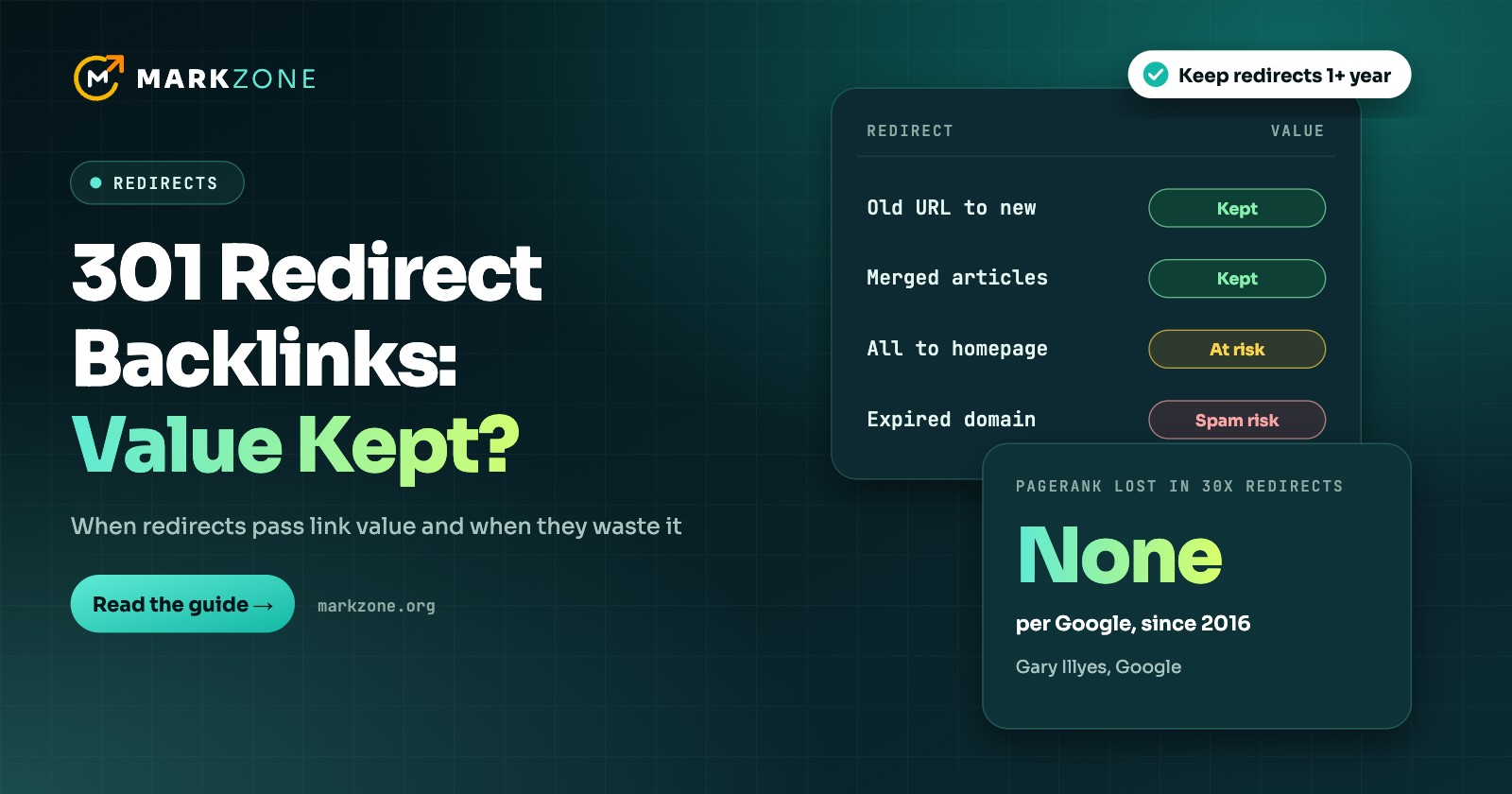
Yes, when the page really moved. Since July 2016, Google has said redirects of the 30x kind don’t lose PageRank. Use a 301 or 308 so Google shows the new URL.
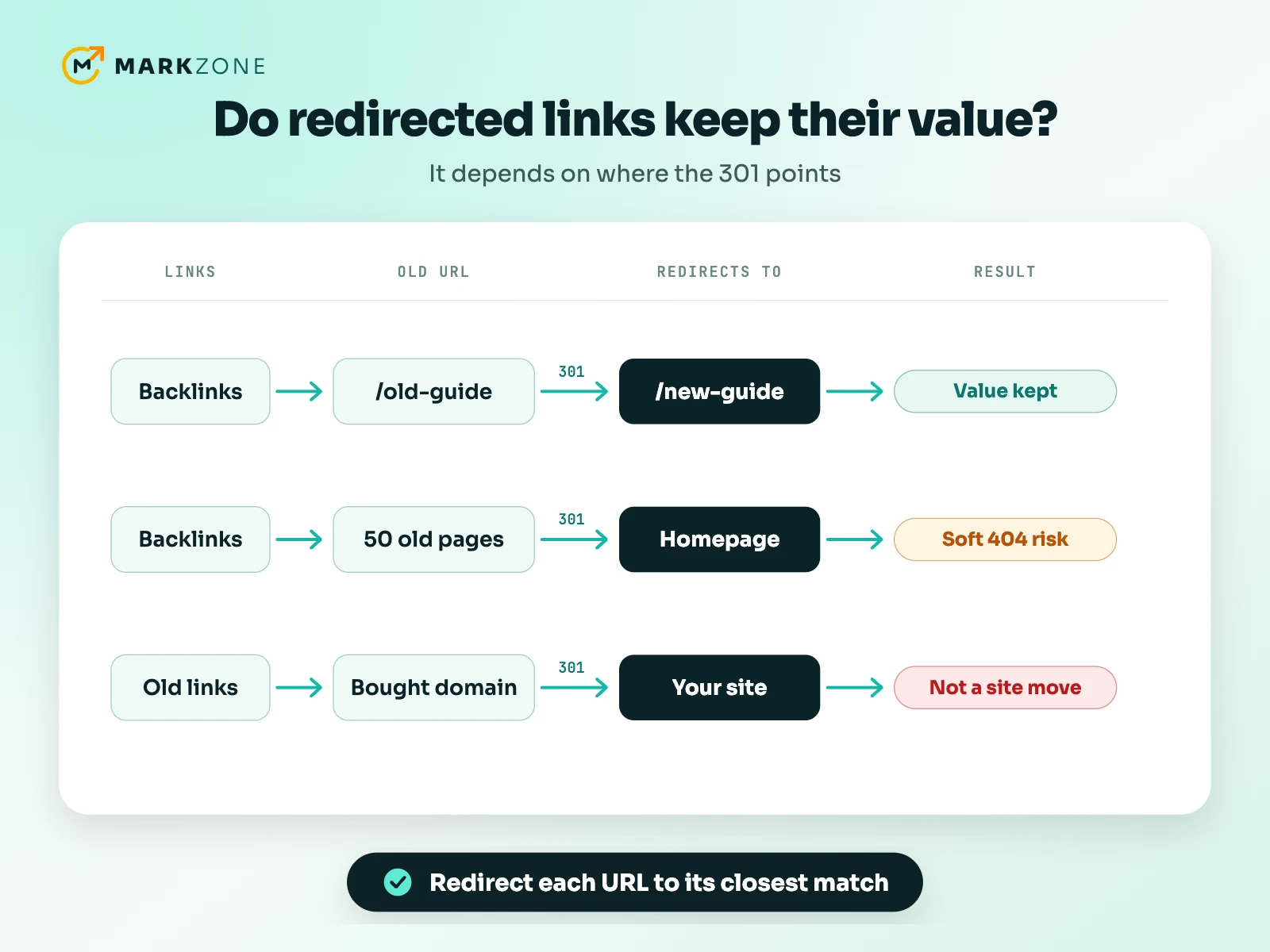
The target decides. Send each old URL to the page that replaces it. Google may treat mass redirects to the home page as soft 404s, which wastes their links.
An expired domain you buy is not a site move. Google’s John Mueller said in 2019 that redirecting expired domains “hasn’t made sense for a long time now.” Google’s expired domain abuse policy covers something else: low-value content on old domains.
Yes. A 301 redirect carries the value of backlinks that point at an old URL over to the new one, as long as the new page does the old page’s job. In 2013, Google said a redirect lost as much PageRank as a link; in July 2016, its Gary Illyes wrote that 30x redirects don’t lose PageRank anymore. Google’s documentation adds that a permanent redirect is a signal that the target should be the canonical URL, the one shown in results. The value is wasted when the redirect points somewhere unrelated, such as the home page, which Google may treat as a soft 404. Redirecting someone else’s expired domain to your site is a separate case, covered below.
We sell link placements, and the links we place sit on publishers’ pages that can move too, so redirects affect our orders as well as your site. Google’s statements are quoted with dates; prices come from the 13 November 2026 study of our catalog.
- Do 301 redirects pass link value?
- What Google has said about redirects and links: a timeline
- When a redirected backlink keeps its value
- What letting linked pages 404 costs, in catalog prices
- How to redirect backlinks the right way
- Redirecting whole domains: moves, mergers and expired domains
- If you buy links: when a publisher redirects your page
- Frequently asked questions
- Sources
Do 301 redirects pass link value?
Google’s redirect documentation says that after a permanent redirect, “the indexing pipeline uses the redirect as a signal that the redirect target should be canonical.” A temporary redirect keeps the source page in results. For a page that has moved for good, Google says: “we recommend that you use a permanent server-side redirect whenever possible.”
| Redirect | How Google treats it | Use it for |
|---|---|---|
| 301 or 308 | Permanent: a signal that the target should be canonical | Pages that moved for good |
| 302, 303 or 307 | Temporary: the source page stays in results | Short-term moves |
| Meta refresh at 0 seconds | Permanent | Only when you can’t set a server redirect |
| JavaScript redirect | Permanent, but rendering can fail | A last resort |
Link value passes only if Google can follow the redirect and finds an indexable page at the end. How that value is shared out in the first place is explained in backlink equity.
What Google has said about redirects and links: a timeline
| Date | Statement | What it means for backlinks |
|---|---|---|
| Feb 2013 | Matt Cutts: “The amount of PageRank that dissipates through a 301 is currently identical to the amount of PageRank that dissipates through a link.” | Then, a redirect cost what a link cost |
| Jul 2016 | Gary Illyes: “30x redirects don’t lose PageRank anymore.” | No loss from 301, 302 or other 30x redirects |
| Dec 2016 | John Mueller, on new URLs without redirects: “Google won’t be able to forward any of the signals from the old pages to the new ones” | A new URL doesn’t inherit links on its own |
| Jun 2017 | Mueller: “301-redirecting for 404s makes sense if you have 1:1 replacement URLs, otherwise we’ll probably see it as soft-404s and treat like a 404.” | Redirect only to a true replacement |
| Jan 2019 | Mueller, on sending pages that should 404 to the home page: “we mostly treat them as 404s anyway (they’re soft-404s)” | Home page dumps waste the links |
| Oct 2019 | Mueller: “redirecting expired domains hasn’t made sense for a long time now” | Buying domains to redirect them is a poor bet |
| Oct 2022 | Mueller, on old links to dead pages: “there’s a good chance these links are irrelevant and wouldn’t change much” | Redirect when a page moves, not years later |
| Mar 2024 | Google adds expired domain abuse to its spam policies | It covers content hosted on old domains; redirects aren’t mentioned |
When a redirected backlink keeps its value
| Situation | Value kept? | Why |
|---|---|---|
| Same page, new URL | Yes | A clean one-to-one move |
| Two articles merged into one | Yes | The new page covers what both did |
| Domain change or rebrand | Yes, with page-to-page redirects | Google’s site move guide says to map each old URL to a new one |
| HTTP to HTTPS | Yes | Same page, new address |
| Discontinued product sent to its closest replacement | It depends | Only if the replacement meets the same need |
| Deleted page sent to the home page | Usually not | Google may treat it as a soft 404 |
| Unrelated expired domain redirected for its links | Unlikely | Not a site move, in Mueller’s words below |
The rule behind every row: a redirect works when the new page does the job the old page did for the people who linked to it.
What letting linked pages 404 costs, in catalog prices
A link to a page that returns 404 passes nothing to your live pages: Google removes 404 URLs from its index, and without a redirect it can’t forward the old page’s signals. To put a price on that, here is what replacing lost links would cost at the typical guest post prices in our price study (13 November 2026; prices exclude writing):
| Replacing 10 lost referring domains with guest posts on… | Typical price each | Cost |
|---|---|---|
| Any priced site in our catalog | $50 | $500 |
| Sites with 1,000 to 4,999 monthly visits | $130 | $1,300 |
| Sites with 10,000 to 49,999 monthly visits | $200 | $2,000 |
A redirect, by contrast, is one rule in your server configuration (step 3 below). Two caveats: a bought post is not the editorial link you lost, and old links may be worth less than this, as Mueller’s October 2022 comment warns. So redirect as soon as a page moves, and start with URLs whose links come from sites that still get traffic.
How to redirect backlinks the right way
- List old URLs that still have links. In Ahrefs’ Best by links report, set the HTTP code filter to 404 to see dead pages with backlinks. In Search Console, the Page indexing report lists URLs as “Not found (404).”
- Map each URL to its closest live match: the new version of the article, the successor product or the matching category. Keep the map in a sheet: old URL, referring domains, new URL, status after the change. If nothing matches, let the URL return 404, as Mueller’s 1:1 test suggests.
- Use a server-side 301. With placeholder paths, a rule looks like this:
# Apache (.htaccess, mod_alias)Redirect permanent “/blog/old-guide/” “https://example.com/blog/new-guide/”
# NGINXlocation = /blog/old-guide/ {
return 301 https://example.com/blog/new-guide/;
}
On WordPress, core already sends a post’s old slug to its new address with a 301, through the wp_old_slug_redirect function. For anything else, use server rules or a redirect plugin. Google’s advice: “Only use JavaScript redirects if you can’t do server-side or meta refresh redirects.”
- Point straight at the final URL. Google’s crawlers “follow up to 10 redirect hops,” but its site move guide asks for chains of “ideally no more than 3 and fewer than 5.” When you add a redirect, update older ones that pointed at the URL you’re now moving.
- Test it. Run curl -IL on the old URL: -I fetches only the headers and -L follows each redirect. You want one 301, then a 200 on the page you chose, and that page must not be noindexed or blocked by robots.txt.
- Update the links you control, internal links first, then ask the sites behind your most valuable backlinks to link to the new URL. Google’s guide says to “update as many links as possible.”
- Keep the redirects. Google says “for as long as possible, generally at least 1 year,” because “This timeframe allows Google to transfer all signals to the new URLs.” For URLs with good backlinks, keep them for good. Asked in 2017 about a 301 removed after a year, Mueller replied: “We’d generally start seeing it as separate URLs at some point.”
Redirecting whole domains: moves, mergers and expired domains
| What you do with a domain | How Google sees it |
|---|---|
| Move your own site to a new domain, page to page | A site move. Expect “temporary fluctuation in site ranking during the move” |
| Merge a business you acquired, content included | Also a site move: Google’s guide lists “merging multiple domains or hostnames” |
| Redirect an unrelated expired domain to your site for its links | Not a site move, in Mueller’s words (below) |
| Host low-value content on an expired domain to rank on its past | Expired domain abuse, a spam policy since March 2024 |
| Use expired domains to publish links to your site | Links made to manipulate rankings, which Google’s spam policies define as link spam; see PBN links |
In October 2019, about an old store’s domain redirected to a new site, Mueller wrote: “Sure a 301 works, but you’re not moving content, you’re creating something new and just trying to take an old site’s links.” In December 2022, about building on old domains, he wrote: “don’t assume there’s old & tasty SEO-juice to lick up just by placing a site on an old domain.”
Google’s spam policies describe expired domain abuse in two steps. Someone buys an expired domain name, and it is then “repurposed primarily to manipulate search rankings by hosting content that provides little to no value to users.” That definition is about what the domain hosts and doesn’t mention redirects. A redirected domain isn’t named there, but Google’s John Mueller has said the tactic doesn’t make sense, so the money spent on the domain is the first thing at risk.
If you buy links: when a publisher redirects your page
Publishers move pages too: an HTTPS switch, a new URL structure, a merged article. What happens to a link you paid for depends on where the old URL goes:
| What the publisher does | What happens to your link |
|---|---|
| Moves the article to a new URL with a page-to-page 301 | It keeps working: the page’s signals and your link move together |
| Merges your article into another one | It survives only if your link was carried over |
| Deletes the article and redirects to the home page or a category | It’s gone, and Google may treat the redirect as a soft 404 |
Backlink tools can make the first case look like a loss: Ahrefs may list the link as lost with the reason “301/302 redirect,” while its help page notes that “the redirected URL will usually still link back to your site.” Open the final page to check. If your link really is gone, removal cover applies: with us, a link that disappears in the first 8 months after it goes live is replaced or refunded.
Before you buy a link on an existing article, run the same curl check on the URL the seller lists. It should answer 200 itself. A 301 means the article has moved or been merged, so judge the page it lands on; a redirect to the home page means the article is gone. Most sites in our catalog offer this format: 13,262 of 22,073 sell links on articles they’ve already published.
Whatever happens to the page, a paid link should carry a qualifier: rel="sponsored" or rel="nofollow". By default, links bought through our catalog are dofollow unless the publisher says otherwise, and a sponsored label is available on request for any order. On Google’s terms, buying and selling links counts as “a normal part of the economy of the web” only “as long as they are qualified.”
Frequently asked questions
Do 302 redirects and redirect chains lose link equity?
Not by Google’s account. Asked about chains in 2018, Mueller said: “For the most part that is not a problem. We can forward PageRank through 301 and 302 redirects.” But a 302 keeps the old URL in results. And Google’s site move guide notes that chaining redirects “adds latency for users,” so use one 301 straight to the final page.
Can I redirect a URL that has been dead for years?
You can, but expect little. Mueller’s October 2022 advice was: “If you see a lot of traffic (users, crawlers) to the 404 pages from there, I’d pick a new URL on your site and 301 redirect to there.” In November 2023 he said the SEO “value” of bringing a 404 back “is probably less than the work you put into it.” Check the old URL’s referring domains and visits first.
How can I see redirected backlinks in Search Console?
In the Links report, a link that reaches your page through a redirect shows the old address in the “Target URL (if different)” column. Google’s explanation for a value there: “Your site redirects visitors from the link URL to the target URL.”
Sources
- Google Search Central: Redirects and Google Search (checked 20 November 2026)
- Google Search Central: How HTTP status codes, and network and DNS errors affect Google Search (checked 20 November 2026)
- Google Search Central: Site moves with URL changes (checked 20 November 2026)
- Google Search Central: Spam policies for Google web search (checked 20 November 2026)
- Google Search Central Blog: What web creators should know about our March 2024 core update and new spam policies (5 March 2024)
- Search Engine Roundtable: Matt Cutts: 301 Redirects Dilute PageRank Equally To Normal Links (26 February 2013)
- Search Engine Roundtable: Google: Any 3xx Redirect Does Not Lose PageRank At All (27 July 2016; Illyes’s tweet of 26 July 2016)
- Search Engine Roundtable: Google: Similar New URLs Won’t Pick Up Old URLs Signals (23 December 2016)
- Search Engine Roundtable: Google: Use 301 Redirects When You Have A 1:1 Replacement (28 June 2017; Mueller’s tweet of 25 June 2017)
- Search Engine Roundtable: When Do Expired Redirects Stop Passing Signals With Google? (8 August 2017)
- Search Engine Journal: Google Shares How 301 Redirects Pass PageRank (29 October 2018)
- Search Engine Roundtable: Google PSA: Do Not 301 Pages that Should 404 To Your Home Page (8 January 2019)
- Search Engine Journal: Should You Buy & Redirect Expired Domains? (11 August 2020; Mueller’s tweet of 9 October 2019)
- Search Engine Roundtable: Google: Redirecting A Domain To A Brand New Site Is Not A Site Move (21 October 2019; Mueller’s tweets of 19 October 2019)
- Search Engine Roundtable: Google: Some Old Links May Be Irrelevant (AKA Link Rot) (11 November 2022; Mueller’s tweets of 25 October 2022)
- Search Engine Roundtable: Google’s John Mueller: Expired & Repurposed Domains Are SEO-Flotsam (12 December 2022; Mueller’s tweet of 9 December 2022)
- Search Engine Roundtable: Google: The SEO Value Of Bringing Back A 404 Page Is Less Than The Effort (27 November 2023)
- Google Search Console Help: Page indexing report (checked 20 November 2026)
- Google Search Console Help: Links report (checked 20 November 2026)
- Ahrefs Help: How to check pages for HTTP status codes in Site Explorer (dated 3 September 2026; checked 20 November 2026)
- Ahrefs Help: Understanding link lost reasons (dated 3 September 2026; checked 20 November 2026)
- WordPress Developer Resources: wp_old_slug_redirect() (introduced in WordPress 2.1.0; checked 20 November 2026)
- curl man page (-I “Fetch the headers only”; -L follows redirects; checked 20 November 2026)
- Markzone: Guest post price study (catalog snapshot of 13 November 2026: median and traffic-tier prices, prices exclude writing, niche edit counts, link type, 8-month link guarantee)
- Markzone: Niche edits (published post; states the 8-month replacement-or-refund terms)
Lost links in a site move?
Tell us what changed. We’ll help you plan new links to the pages that matter most now.

Muhammad Suleman is the founder of Markzone. He has done guest posting and link building since 2018 and has worked with hundreds of clients. Today his team handles 300–400 orders a month for brands and SEO agencies, with publisher sites in every major niche. He leads outreach, site checks and reporting, and writes about link building from his daily work with publishers and clients.