Your backlink profile is every link pointing to your site. It covers who links to you, which pages they link to, the anchors they use and how fast links arrive.
Healthy means natural. Relevant sites, mostly brand and URL anchors, a mix of followed and nofollow links, and steady growth.
Spammy links are usually ignored. Google says it can work out which links to trust in most cases, so focus on building good links rather than chasing bad ones.
A backlink profile is the full set of links pointing to your website. It covers which sites link to you, which of your pages they link to and the anchor text they use. It also shows whether the links are followed or nofollow, and how quickly new links arrive. A healthy profile looks natural, with links from relevant, real websites, mostly brand and URL anchors, a mix of link types and steady growth. You build one by earning and placing good links over time, at a pace that fits your site, rather than chasing a number.
What a backlink profile includes
- Referring domains. The number of websites that link to you. This usually matters more than the total number of links, because ten links from one site still come from one site.
- The linking sites. Their topics, traffic and own backlinks.
- Target pages. Which of your pages get links: your homepage, your guides, your product pages.
- Anchor text. The clickable words used in links to you.
- Link attributes. How many links are followed and how many are nofollow, sponsored or ugc.
- Growth over time. How many new referring domains you gain and lose each month.
What a healthy backlink profile looks like
There is no perfect template, but healthy profiles share the patterns you would expect when real people link to a site because they want to:
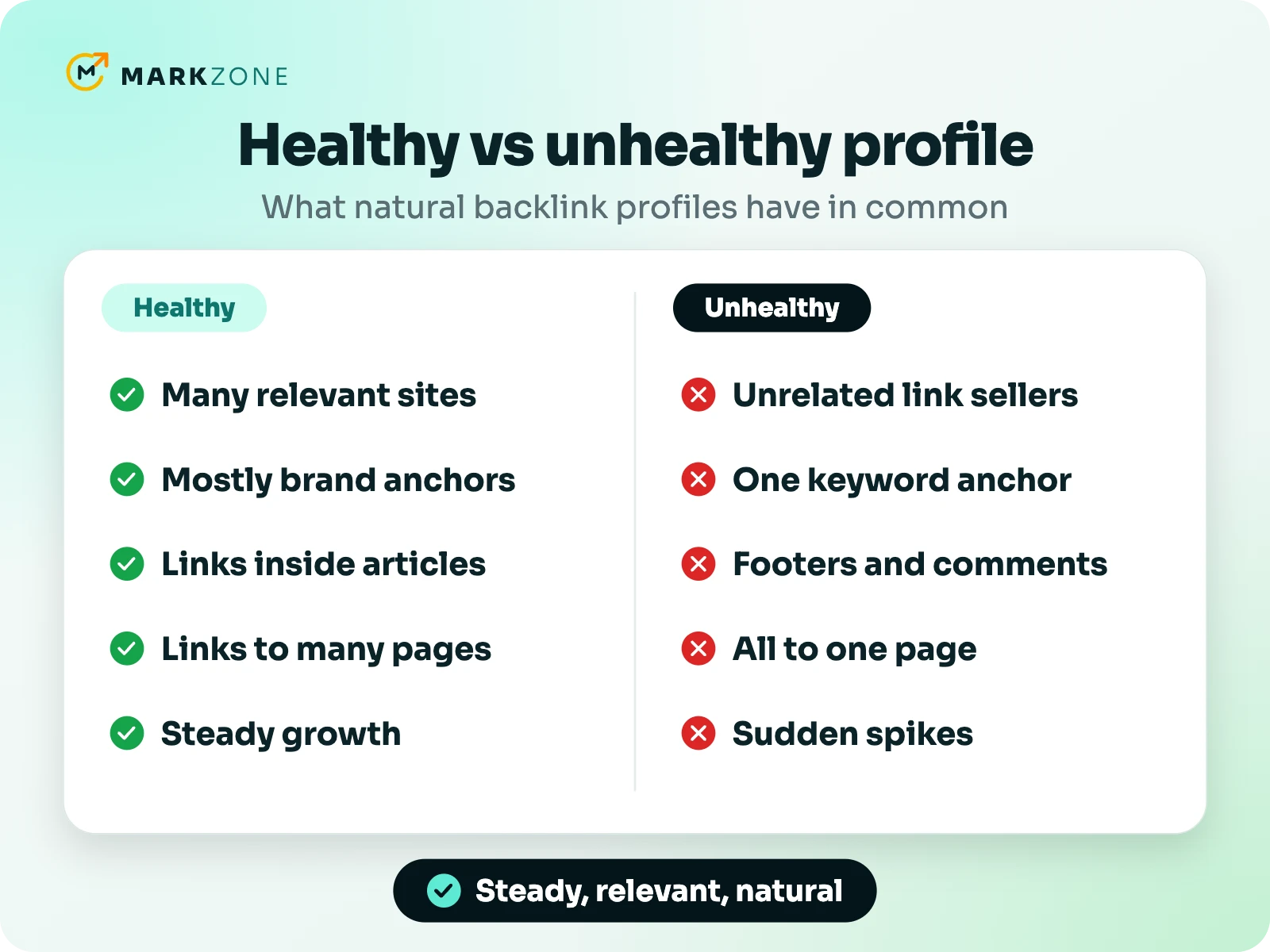
| Signal | Healthy | Unhealthy |
|---|---|---|
| Linking sites | Many different, relevant sites with real readers | Unrelated, low-quality or link-selling sites |
| Anchor text | Mostly brand, URL and natural phrases | The same keyword anchor again and again |
| Placement | Mostly inside the main text of articles | Footers, sidebars, comments and profiles |
| Link attributes | Mostly followed, with some nofollow | Followed links only, all from deals you arranged |
| Target pages | Spread across the homepage and useful pages | Almost all to one money page |
| Growth | Steady, in line with your site and competitors | Sudden spikes from sites you don’t recognize |
Two of these deserve a closer look. For anchors, Google’s spam policies call “links with optimized anchor text in articles, guest posts, or press releases distributed on other sites” link spam. So a profile full of keyword anchors is a warning sign. We cover the right mix in keyword backlinks. For growth, Google’s John Mueller has said the number of links in a period of time isn’t the issue; the kind of activity behind them is. Still, a small site that suddenly gains far more links than it has ever had is taking a risk. Our guide to how many backlinks per day is safe shows how to set your pace.
How to check your backlink profile
- Start with Google Search Console. The Links report shows your top linking sites, your most-linked pages and your top linking text. It’s a sample, Google notes, not a full list.
- Use a backlink tool for detail. Ahrefs, Semrush, Moz and Majestic each crawl the web themselves, so their numbers differ. Pick one and stick with it, so your trends are comparable.
- Count referring domains, not links. Look at the total and at how many you gain and lose each month.
- Review the anchors. Check what share of your links use your brand or URL, and which pages get keyword anchors.
- Look at the sites themselves. Open a sample of linking sites. Are they real, relevant and readable?
- Compare with competitors. Run the same checks on the pages that outrank you. Their profiles show what is normal in your niche and how big your gap is. Our guide to how many backlinks you need shows how to measure it.
How to build a healthy backlink profile
1. Start with the links you can get easily
Partners, suppliers, industry associations, local organizations and the directories that matter in your field. These links show you are a real business and help people find you.
2. Publish things worth linking to
Useful guides, original data and free tools attract links you don’t have to ask for. Those editorial links are the core of any healthy profile.
3. Add links from relevant sites at a steady pace
Guest posts and link insertions on sites in your niche let you choose the site, the page and the anchor. Add them at a steady pace that fits your site’s size and history, not in one big burst. Our guide to how many backlinks per day is safe shows how to set that pace.
4. Keep anchors natural
Use your brand, your URL and descriptive phrases for most links, and save exact-match keywords for the occasional link where they fit naturally.
5. Point links at more than one page
Link to your guides, category pages and resources, not only your homepage or your main sales page. Then use internal links to pass that value to the pages you want to rank.
6. Keep checking
Review new and lost links once a month. Lost links happen: pages get deleted or edited. If a link you paid for disappears, ask the seller to replace it.
Listings show DR and, for most sites, Ahrefs traffic and price, so you can pick sites that fit your profile.
What about toxic or spammy backlinks?
Most sites pick up some spammy links they never asked for. Google’s guide to disavowing links says that “in most cases, Google can assess which links to trust without additional guidance.” It suggests using the disavow tool only if you have a considerable number of spammy, artificial or low-quality links. Those links must also have caused, or be likely to cause, a manual action. So if you didn’t build those links and don’t have a manual action, you usually don’t need to do anything.
The exception is links you or a previous SEO provider built through schemes, such as private networks or bulk link packages. If those could lead to a manual action, try to get them removed, and disavow the ones you can’t.
Frequently asked questions
What is a good backlink profile?
One with links from many relevant, real websites and mostly natural anchors. It has a mix of followed and nofollow links, links to several of your pages and steady growth that fits your site.
How many backlinks should a healthy profile have?
There is no fixed number. Compare your referring domains with the pages that rank for your keywords, and close the gap steadily.
Should a backlink profile have nofollow links?
Yes, some. Real websites get nofollow links from social media, forums and sites that nofollow outbound links by default. A profile with only followed links can look arranged.
How often should I check my backlink profile?
Once a month is enough for most sites. Look at new and lost referring domains, new anchors and any sudden jumps you can’t explain.
Can a competitor hurt my backlink profile with spam links?
Usually not. Google says that in most cases it can work out which links to trust on its own, so random spam links usually don’t need any action.
Want to grow your profile the healthy way?
Tell us your website, and we’ll suggest relevant sites and a monthly pace that fits your profile.

Muhammad Suleman is the founder of Markzone. He has done guest posting and link building since 2018 and has worked with hundreds of clients. Today his team handles 300–400 orders a month for brands and SEO agencies, with publisher sites in every major niche. He leads outreach, site checks and reporting, and writes about link building from his daily work with publishers and clients.